
Av not blowing enough?
Category: Internal
Anything that is not suppose to be shown to guests, or vendors, only corporate.
-
WordPress Taxonomies Explained: Understanding Permalinks, Qu
WordPress Taxonomies Explained: Understanding Permalinks, Query Variables, and Public Access
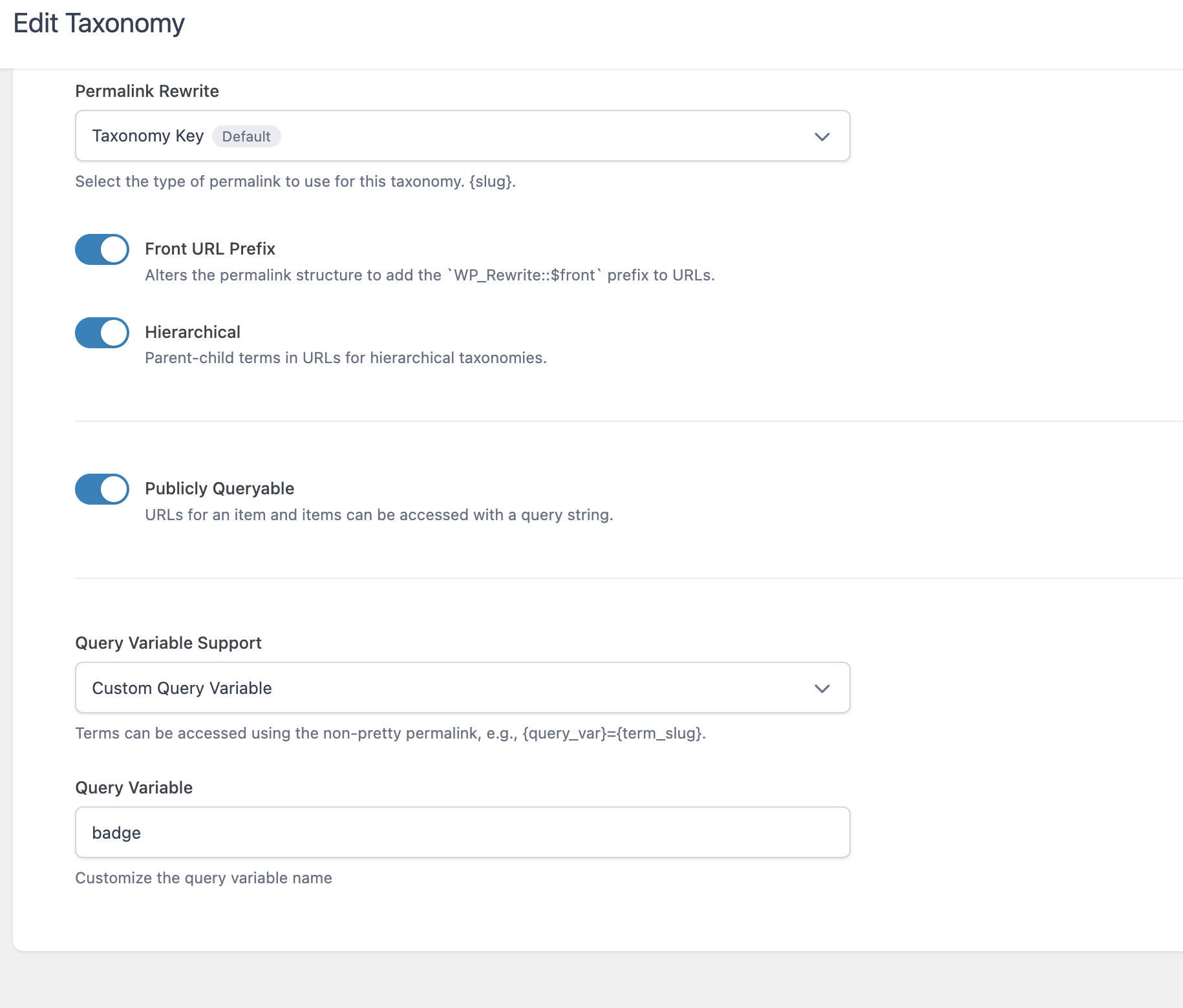
When I first looked at the Taxonomy settings screen in WordPress, I saw terms like Permalink Rewrite, Hierarchical, and Query Variable. If you’re new to WordPress development, those settings can feel intimidating.
The good news is that they’re actually much simpler than they appear.
Let’s use a real example.
My Example
I’m creating a taxonomy that uses the query variable:
badgeThat means I’m organizing content by badges.
Imagine I have badges like:
- Gold
- Silver
- Verified
- Featured
Each badge becomes a taxonomy term.
Think of a taxonomy as simply another way to organize content.
Posts have Categories.
Posts have Tags.
You can create your own grouping called Badges.
What is a Taxonomy?
A taxonomy is nothing more than a way to organize things.
Think about your computer.
You might have folders like
Documents
Pictures
Taxes
Invoices
Those folders help organize files.
A taxonomy does the same thing inside WordPress.
Instead of organizing files…
…it organizes Posts, Products, Listings, or any Custom Post Type.
What is a Term?
Inside every taxonomy are terms.
For example
Taxonomy
BadgesTerms
Gold
Silver
Verified
Premium
The taxonomy is the container.
The terms are the individual labels.
Permalink Rewrite
This setting determines what the URL looks like.
Suppose my taxonomy is called
badgeand I have a term named
goldThe URL might become
https://example.com/badge/gold/Notice how badge appears in the URL.
That’s the taxonomy key.
If I changed the taxonomy key to
achievementthe URL would become
https://example.com/achievement/gold/Nothing about the content changed.
Only the URL structure changed.
Front URL Prefix
This setting depends on your site’s permalink structure.
Most websites never need to worry about it.
Suppose all of your posts already live under
https://example.com/blog/If Front URL Prefix is enabled, your taxonomy URLs might become
https://example.com/blog/badge/gold/instead of
https://example.com/badge/gold/If your site doesn’t use a front prefix, turning this on or off often makes no visible difference.
Hierarchical
This allows parent and child terms.
Imagine this structure.
Awards
    Gold
    Silver
Instead of
badge/goldthe URL could become
badge/awards/goldThis is very similar to folders on your computer.
Photos
    Vacation
        Florida
The hierarchy simply preserves the path.
Publicly Queryable
This determines whether people can actually visit the taxonomy.
If this is enabled…
Someone can visit
example.com/badge/goldand WordPress will display all content tagged with the Gold badge.
If disabled…
The taxonomy still exists internally, but visitors cannot browse it directly.
This is useful when a taxonomy is only meant for administrative purposes.
Query Variable
This is one of the easiest settings to understand once you see an example.
Mine is set to
badgeThat means WordPress also understands URLs like
example.com/?badge=goldThis is called a query string.
Instead of using the pretty URL
example.com/badge/goldWordPress reads
?badge=goldBoth are simply two different ways of asking WordPress for the same information.
Pretty URL vs Query String
Pretty URL
example.com/badge/goldQuery String
example.com/?badge=goldThey both tell WordPress exactly the same thing.
“Show me everything with the Gold badge.”
One looks cleaner.
The other is easier for computers and developers to generate.
Bringing It All Together
Using my settings, WordPress understands requests like these.
Pretty permalink
/badge/gold/Query variable
?badge=goldBecause Hierarchical is enabled, it can also understand URLs like
/badge/awards/gold/And because Publicly Queryable is turned on, visitors can actually browse those pages.
Final Thoughts
Many WordPress settings look technical simply because of the terminology. In reality, these options answer a few straightforward questions:
- What should the URL look like? (Permalink Rewrite)
- Should parent and child terms appear in the URL? (Hierarchical)
- Can visitors browse this taxonomy? (Publicly Queryable)
- Can WordPress also find it using a URL parameter? (Query Variable)
Once you understand those four ideas, you’ve grasped most of what this settings page is doing. The rest is simply WordPress giving you flexibility in how your content is organized and how users—and WordPress itself—can access it.