Author: Jay

  • CORPORATE LEASING AGREEMENT Example

    CORPORATE LEASING AGREEMENT Example

    CORPORATE LEASING AGREEMENT

    Chi Suite | P2014-S4
    Between: GeegTech Co. (“Lessor”)
    And: (Client Name) (“Lessee”) ← Replace with company/individual name

    1. Suite Overview

    This Agreement governs the corporate lease of the Chi Suite (P2014-S4), a fully furnished 164.67 sq ft private studio residence including:

    • Bedroom, bathroom, closet, TV, desk & queen bed

    • High-speed internet, linens, weekly cleaning

    • Utilities included

    Property Address: (Property Address) ← Replace with correct address
    Property Owner: East 125th LLC
    First Leaseholder: GeegTech Co.
    Sublessee: (Client Name) ← Replace with tenant name

    2. Term & Structure

    • Lease Term: 5 years from date of signature

    • Start Date: (Date of Signature) ← Insert signed date

    • Automatic Renewal: Resets to 5 years upon resale or reassignment

    • Control: Lessee holds exclusive use rights; GeegTech Co. retains asset ownership and purchase rights

    3. Financial Terms

    Description Amount
    Monthly Rent $430.00
    – Base Rent $330.00
    – Utilities & Cleaning $100.00
    Per-Checkout Fee $25.00
    One-Time Setup Fee Free
    Non-Refundable Deposit $17,420.00
    First 6 Months’ Rent $2,580.00
    Total Due at Signing $20,000.00

    💡 The $17,420 deposit reflects trailing 12-month revenue and qualifies the lease for income potential and buyback eligibility (see Section 8). This structure avoids taxable asset transfers and counts as a deductible corporate expense.

    4. Use Rights & Earnings

    Lessee has full access and may:
    ✅ Use the suite for personal or employee lodging
    ✅ Earn income from unoccupied nights

    Revenue Model:

    “Use it when you need it, earn from it when you don’t.”

    • 100% of net earnings go to Lessee (minus cleaning/transaction fees)

    • All bookings must follow StayWithJay house rules

    5. Management Options

    Option Notes
    GeegTech Co. Manages Turnkey, no setup fee required
    Lessee Self-Managed $330 setup fee for branded booking site
    Hybrid Branding Custom scope by request

    6. Transferability & Exit (Corporate Lease Only)

    • Lease may be reassigned only with written approval from GeegTech Co.

    • GeegTech Co. retains a permanent right of first refusal

    • Lease must be offered via StayWithJay.com or CatalystWin.com for 30 days before any public listing

    • No guaranteed buyback or exit commitment is implied

    7. Corporate Leasing Election

    Select one:

    ☐ Option A – Exclusive Corporate Use
    All nights blocked for employees only. No public booking. Private portal provided.

    ☐ Option B – Released-to-Earn Hybrid (Default)
    Nights automatically released to the public 30 days out.

    • Lessee can override by blocking nights in advance

    • Revenue from released nights paid monthly

    • Guaranteed fallback: other rooms in the residence available at $33/night

    • Grants Buyback Guarantee eligibility (see Section 8)

    8. Buyback Guarantee (For Option B Only)

    Available after 33 months of active lease.
    If Lessee:

    • Releases all unused nights at least 30 days in advance, and

    • Lease remains in good standing,

    Then GeegTech Co. agrees to offer a Buyback Reimbursement based on:

    Formula:
    Buyback = Deposit – Net Profit × (Released Nights ÷ 990 Eligible Nights)

    • Released Nights: Nights made available to platform 30+ days in advance

    • Eligible Nights: ~990 over 33 months

    💡 Example: If $13,500 profit was earned and 900 nights were released:
    $17,420 – $13,500 = $3,920 × (900/990) = $3,564 reimbursement

    9. Minimum Guarantee Clause

    To be eligible for any financial protections or buyback:

    • Lease must remain active and unbroken for 33 consecutive months

    • Early cancellation or reassignment forfeits all guarantees

    10. Signature & Acknowledgment

    By signing, both parties agree to all terms listed, including:

    • 5-Year Lease Agreement

    • Use structure selected above

    • Non-refundable deposit of $17,420

    • Revenue model and liability policies

    Lessee (Company): _____________________________________
    Authorized Signatory: ____________________________________
    Date: ____________________
    GeegTech Co. (Lessor): __________________________________
    Authorized Signatory: ____________________________________
    Date: ____________________
  • ✅ WEB DEVELOPMENT MILESTONE — Google Sign-In Integration Completed for StayWithJay.com

    ✅ WEB DEVELOPMENT MILESTONE — Google Sign-In Integration Completed for StayWithJay.com


    ✅ WEB DEVELOPMENT MILESTONE — Google Sign-In Integration Completed for StayWithJay.com

    Milestone Date: November 21, 2025

    Platform: StayWithJay.com

    Owner: Jay Silva

    Status: ✔ Completed

    Purpose: Enable Google OAuth login for guests, partners, support team, and operational staff.


    1. Objective

    Implement Sign in with Google on StayWithJay.com using the official Google Site Kit plugin, ensuring:

    • Fast authentication
    • Secure OAuth 2.0 integration
    • Future use for guest dashboards, staff portals, investor pages, and review systems
    • Alignment with Catalyst Win’s unified login ecosystem

    2. Google Cloud Identity Configuration

    Inside Google Cloud → Google Identity → Site Kit integration, the following values were used:

    • Project Name: StayWithJay
    • Application Name: StayWithJay
    • Support Email: jayaugustosilva@gmail.com
    • Authorized JavaScript Origin:
      https://clevelandbyjay.com
      
    • Authorized Redirect URI:
      https://clevelandbyjay.com/wp-admin/index.php?oauth2callback=1
      

    After submitting the credentials, Google generated the OAuth client.


    3. OAuth Credentials Generated

    StayWithJay now has its OWN dedicated OAuth client:

    Client ID:

    1065105042404-6ik138fv8pdbdph2540mli23ni79n75i.apps.googleusercontent.com
    

    (Stored in Google Cloud + WP Site Kit)

    This ID is specific to StayWithJay.com and completely separate from the CatalystWin.com login system.


    4. WordPress Site Kit Setup

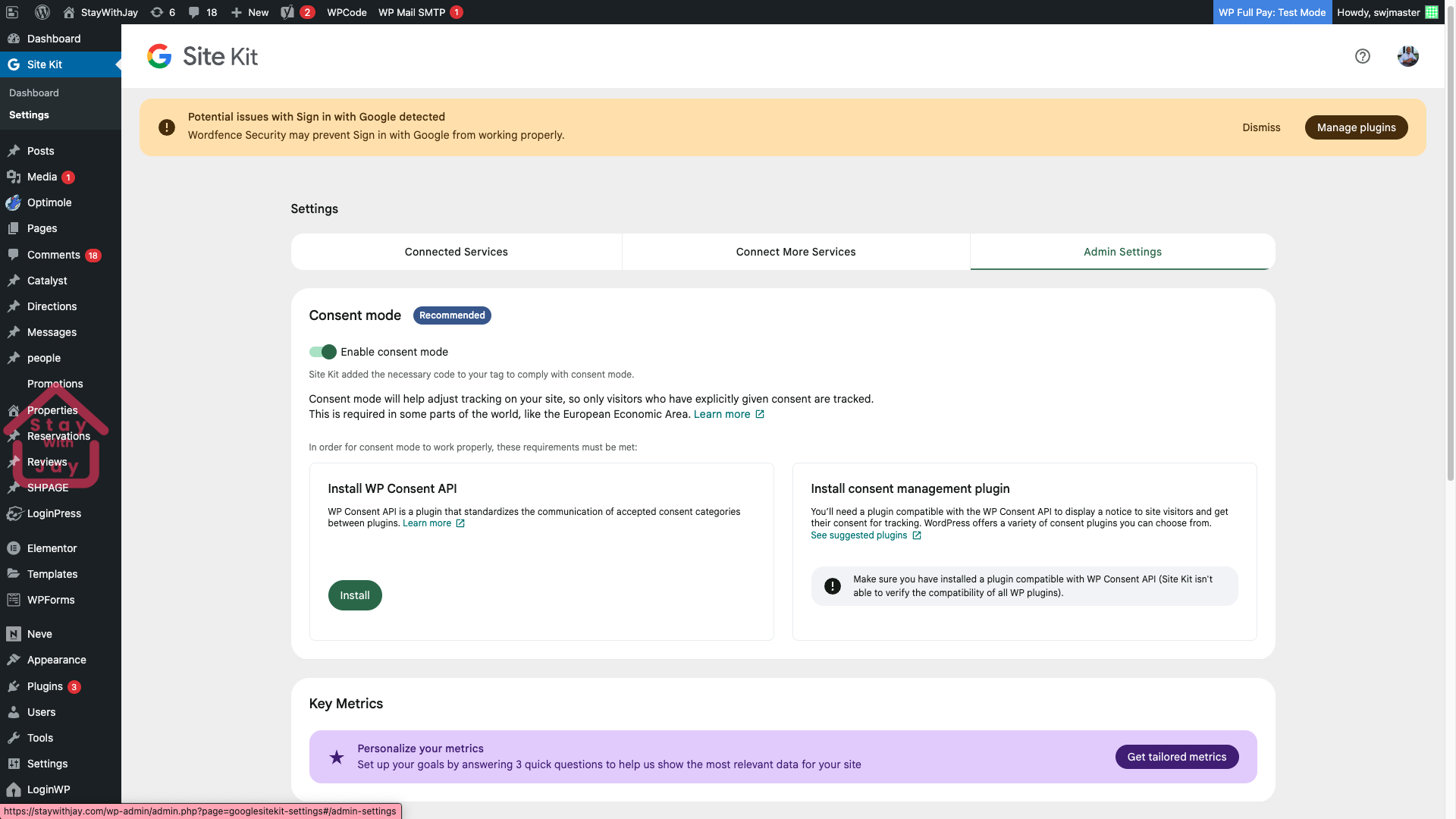
    Inside WordPress Admin → Site Kit → Settings, Google Sign-In was configured using the newly created Client ID.

    Site Kit confirmed successful integration and displayed the Connected state.

    System notices reviewed:

    • WordFence warning (does not block functionality)
    • Consent mode optional

    5. Screenshots Included in This Milestone

    (All screenshots from the user’s environment stored for documentation)

    Screenshot A — Google CloudOAuth Setup

    /mnt/data/Screenshot 2025-11-28 at 15.34.30.png
    /mnt/data/Screenshot 2025-11-28 at 15.34.30 (2).png
    /mnt/data/Screenshot 2025-11-28 at 15.34.42.png
    /mnt/data/Screenshot 2025-11-28 at 15.34.42 (2).png

    Screenshot B — WordPress Site Kit Admin

    /mnt/data/Screenshot 2025-11-28 at 15.38.37.png
    /mnt/data/Screenshot 2025-11-28 at 15.38.37 (2).png

    Screenshot C — Browser Views / Environment

    /mnt/data/Screenshot 2025-11-28 at 15.34.42.png (Map view / environment context)


    6. Result

    StayWithJay.com now has a fully active Google Sign-In integration, enabling:

    • One-click login for staff, partners, and guests
    • Future integration with StayWithJay dashboards
    • Consistent auth system across Catalyst Win & StayWithJay platforms

    7. Next Scheduled WebDev Actions

    (These will be built as separate posts, as previously planned.)

    Post A — Customize the Google Login Button

    Colors, size, shape, text, branding alignment.

    Post B — Add Google Login to Any Page

    Shortcodes, custom blocks, Elementor, PHP template injection.

    Post C — Enable Google-Based Registration

    Allow visitors to create accounts through the StayWithJay site using Google.


    Milestone Completed

    StayWithJay now supports Google OAuth authentication using a dedicated, properly configured client.


  • Go Lux Room – Entrance & Access Instructions

    Go Lux Room – Entrance & Access Instructions

    Please enter through the side door located along the driveway.
    Enter your access code and press the pound key (#) to unlock the door.

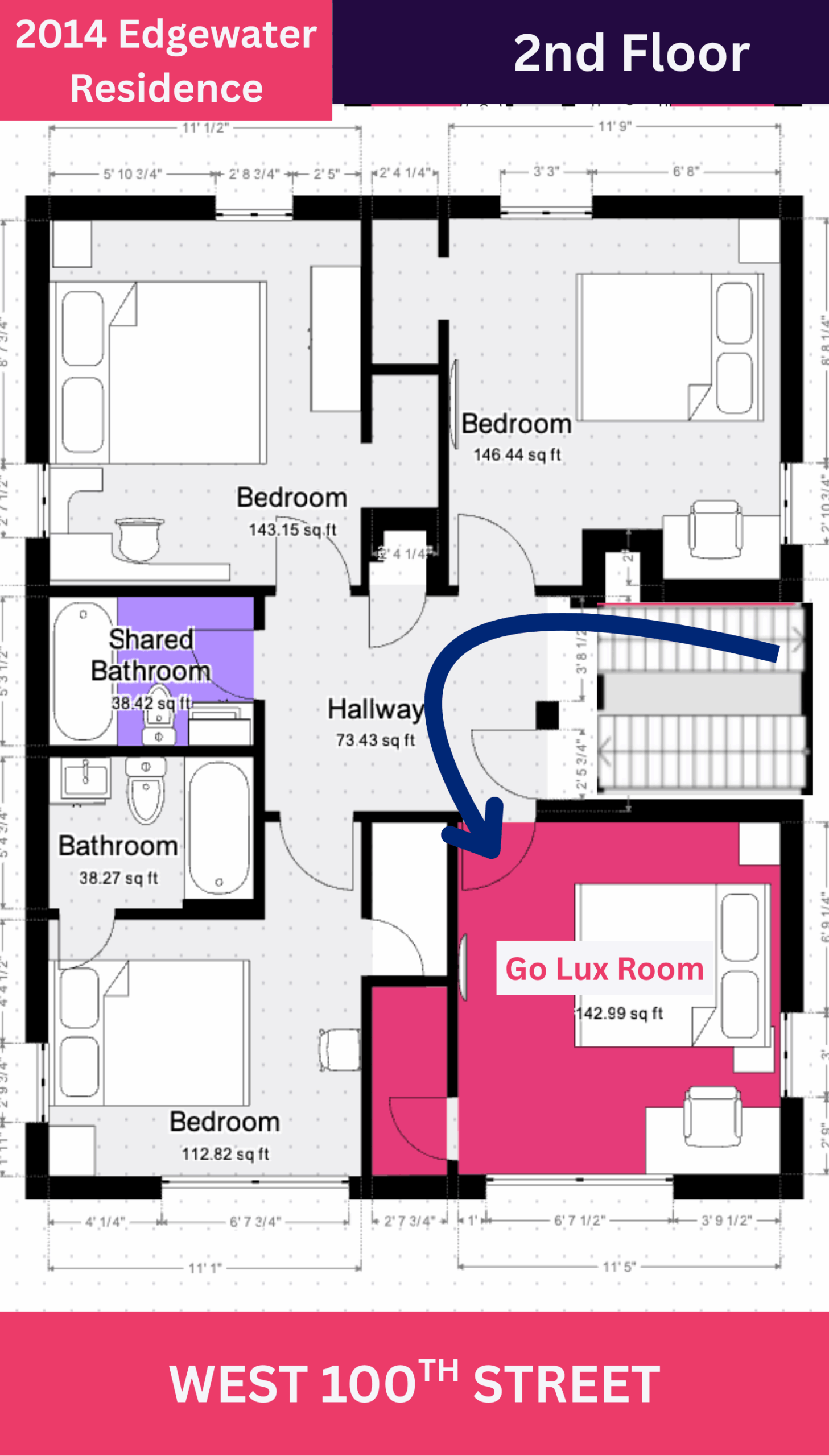
    Once inside, walk straight ahead and take the staircase to the 2nd floor.
    At the top of the stairs, turn left, and your room — Go Lux Room — will be the first door on the right, as shown in the floor-plan image.