Category: Internal

Anything that is not suppose to be shown to guests, or vendors, only corporate.

  • StayWithJay – ACF + WPForms Integration for Guest Data and Conditional Visibility

    StayWithJay – ACF + WPForms Integration for Guest Data and Conditional Visibility

    🛠 StayWithJay – ACF + WPForms Integration for Guest Data and Conditional Visibility

    Overview

    We have successfully connected WPForms (User Registration add-on) to ACF User Fields so that when a user registers, all key reservation details and entitlements (LaundryPaid, ListingID, ReservationCode, etc.) are saved directly on their WordPress user profile.

    This setup allows us to use conditional visibility rules (Otter Blocks, GenerateBlocks, etc.) to control what each guest sees when logged in, based on their stored user meta.

    In short: Every guest is now a profile with dynamic entitlements.


    ✅ Visibility Mapping Table

    ACF/User Field Condition Show/Hide Example
    LaundryPaid = true Reveal Laundry Code tile (button with code)
    VisitorPass = true Show Visitor Access instructions
    lastreservationcode matches active reservation Show “Active Stay Dashboard”
    listingID = property ID Show property-specific rules, guides, and codes
    smartlock_code not empty Show SmartLock instructions
    guest_count > 1 Show extra guest policy or fees
    platform = airbnb / direct / booking Adjust messaging (e.g., review link for Airbnb vs. direct booking incentives)

    ✅ FAQ – Next Steps & Clarifications

    Q1. How are user fields updated?
    👉 Using the WPForms User Registration add-on, mapped fields (phone, reservation code, listing ID, etc.) are stored as user meta when a new user is created.

    Q2. What about forms that don’t register users (like laundry pass payments, upsells, or contact forms)?
    👉 By default, they don’t update user meta. To make them update ACF fields for logged-in users:

    • Use Zapier integration, or
    • Add a WPCode snippet (see below) hooked into wpforms_process_complete to update user meta directly.

    Q3. Can a button (without a form) update ACF fields?
    👉 Not directly. A button would need to fire an AJAX or PHP function that runs update_user_meta() / update_field() for the logged-in user. This is possible but requires custom code.

    Q4. How do we handle coupons or promos?
    👉 Add a field like has_coupon. When a guest clicks “Yes” to claim a coupon, update their user meta. The Promotions page can then show active coupons only to users with has_coupon = true.

    Q5. How do we handle multiple reservations per user?
    👉 Currently, we overwrite lastreservationcode. For a full reservation history, we’d add a repeater field in ACF or use a separate “Reservations” CPT linked to the user.

    Q6. Can we consolidate the multiple check-in forms?
    👉 Yes. Since all forms now map to the same user meta structure, we can migrate toward a single dynamic check-in form. It would adjust what it shows/collects based on the user’s booking details (ListingID, guest_count, etc.), reducing maintenance across multiple forms.


    ✅ Code Example – Updating ACF/User Meta From Non-Registration Forms

    Drop this into WPCode or your theme’s functions.php. It ensures that if a logged-in user submits any WPForm, their ACF fields are updated with the submitted values.

    /**
     * Update user meta (ACF fields) after WPForms submission
     */
    add_action( 'wpforms_process_complete', function( $fields, $entry, $form_data, $entry_id ) {
    
        // Only proceed if user is logged in
        $user_id = get_current_user_id();
        if ( ! $user_id ) {
            return;
        }
    
        // Example: Laundry Paid toggle
        if ( isset( $fields[7]['value'] ) && $fields[7]['value'] === 'Long Term Laundry Pass' ) {
            update_user_meta( $user_id, 'LaundryPaid', true );
        }
    
        // Example: Reservation Code (field ID 2)
        if ( isset( $fields[2]['value'] ) ) {
            update_user_meta( $user_id, 'lastreservationcode', sanitize_text_field( $fields[2]['value'] ) );
        }
    
        // Example: Listing ID (field ID 3)
        if ( isset( $fields[3]['value'] ) ) {
            update_user_meta( $user_id, 'listingID', sanitize_text_field( $fields[3]['value'] ) );
        }
    
    }, 10, 4 );
    

    🔑 Replace 2, 3, 7 with the actual field IDs from your form builder. Each submitted field can update its corresponding ACF field on the user profile.


    ✅ Roadmap – Immediate Next Steps

    1. Finalize ACF Field List → confirm all required guest entitlements (LaundryPaid, VisitorPass, SmartLock, etc.).
    2. Map Existing Forms → ensure each WPForm is updating user meta consistently.
    3. Migrate Check-In Forms → start consolidating multiple check-in forms into a single dynamic form powered by conditional visibility + ACF user meta.
    4. Front-End Pages → build branded pages (Laundry Pass, Visitor Pass, Promotions) that reveal sections based on user meta.
    5. Coupons & Promotions → add has_coupon field + build Promotions page with conditional visibility.

    📌 Key Takeaway:
    We now have a single source of truth: ACF user fields.
    Forms → update fields → conditional visibility on front end → guests only see what they need.


  • Connecting WordPress Sites under StayWithJay.com to Stripe (Email + Domain)

    Connecting WordPress Sites under StayWithJay.com to Stripe (Email + Domain)

    📌 Web Dev Instructions: Connecting WordPress Sites under StayWithJay.com to Stripe (Email + Domain)

    1. Why This Matters

    • Stripe sends payment receipts, invoices, and notifications to guests.
    • By default, those emails come from @stripe.com.
    • To build trust and brand consistency, we configure Stripe to send from our domains (e.g., support@staywithjay.com).
    • This requires DNS verification (SPF/DKIM/DMARC records) for each domain we want Stripe to send from.

    2. Current Status (StayWithJay.com)

    ✅ Stripe DNS records added in cPanel.
    ✅ Verification is in progress (takes 24–72h).
    ✅ Once active, all Stripe receipts will send from support@staywithjay.com.


    3. Other Domains (catalystwin.com, ceosgrind.com, etc.)

    • Yes, the same Stripe account can send from multiple domains.
    • For each domain, you must repeat the DNS setup (TXT + CNAME records provided by Stripe for that domain).
    • Example: If we want support@catalystwin.com or billing@ceosgrind.com to send receipts, we must verify those domains just like we did for staywithjay.com.
    • You do not need multiple Stripe accounts — one Stripe account can handle multiple verified sending domains.

    4. WordPress Site Configuration

    Each WordPress site under our brand must:

    1. Use WP Mail SMTP with the correct domain email (support@domain.com).
    2. Ensure Return Path = ON (so bounces go back to our mailbox).
    3. Once the domain is verified in Stripe, we can set Stripe’s sender email to match.

    5. When We Can Change Stripe Settings

    • In your Stripe dashboard (screenshot #2): the “Send email from this domain” button is currently disabled because the domain is still “Verifying.”
    • Once verification passes ✅, Stripe will allow you to:
      • Enable Send email from this domain.
      • Send a test email to confirm.

    At that point, all Stripe-generated receipts will officially come from support@staywithjay.com.


    6. To-Do Checklist for Devs

    • Repeat DNS setup for each domain we want to use with Stripe.
    • Verify each domain inside Stripe.
    • Configure WP Mail SMTP on each WordPress site to match its domain’s support email.
    • After verification, enable “Send email from this domain” in Stripe.
    • Test transactions and confirm receipts come from the correct email.

    ✅ Deliverable for Devs:
    All WordPress sites under StayWithJay.com (and related domains like catalystwin.com, ceosgrind.com) will send Stripe receipts and site emails from their own branded domain emails instead of @stripe.com.


  • Is it Green or Is it Yellow? Verde o Amarillo? Preventing Check In misshaps

    Is it Green or Is it Yellow? Verde o Amarillo? Preventing Check In misshaps

    For every check in, we must ensure the lock codes have parsed fully by checking green v yellow
    If Yellow, log into TTLock, and grab the emergency codes for that specific room, then send it to guest.

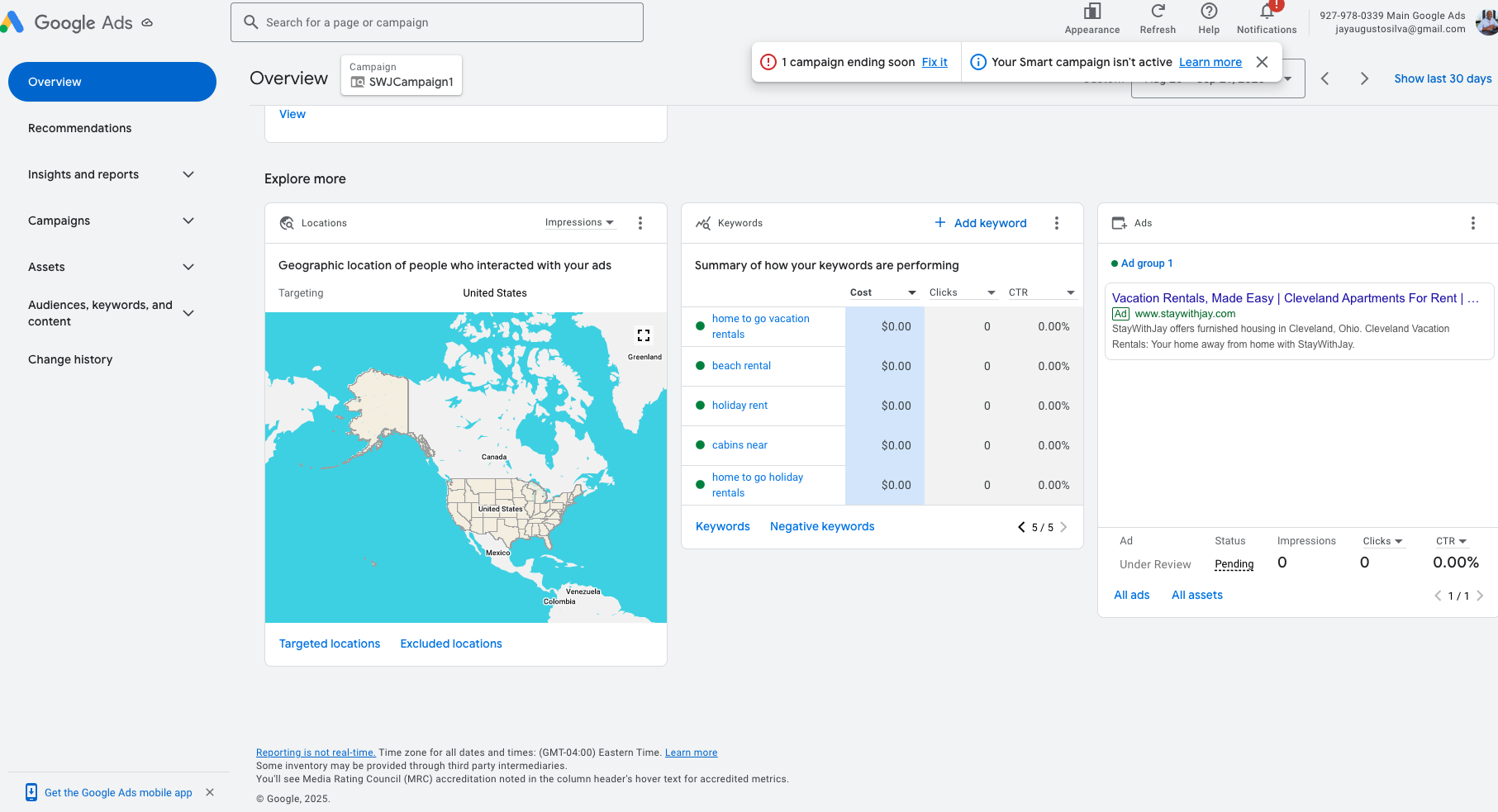
  • 🧠 Internal Update: AdSense Campaign Setup – 2025-09-22

    🧠 Internal Update: AdSense Campaign Setup – 2025-09-22


    🧠 Internal Update: AdSense Campaign Setup – 2025-09-22

    Meeting Summary
    We had our kickoff meeting with the Google AdSense representative to initiate our digital ad strategy aimed at driving direct bookings through our website. This is part of our broader goal to improve profitability and reduce reliance on third-party platforms.


    ✅ What Was Accomplished:

    • AdSense Account Configuration:
      Initial account was verified and configured. The rep confirmed we can create sub-accounts to manage campaigns for each brand or website individually.
    • Campaign Launch:
      Our first Smart Campaign was launched with a $70/week budget.

      • Google projects that if tags and structure are correctly implemented, this should drive ~58 visitors/week.
      • Target return goal: cover ad spend + generate profit (~$10–$15 retained per night).
    • Target Audience Alignment:
      We confirmed that travel nurses, extended stay guests, and direct-booking travelers will be our core personas.
      Keywords NEED adjusted to reflect this intent.
    • Next Steps from Google Rep:
      • They will send follow-up documentation on proper tag placement (critical for tracking and conversion).
      • The rep mentioned that tagging accuracy on the site will directly impact optimization and visibility.

    📌 Notes for Web Dev Team:

    • You will need to ensure all necessary conversion tracking tags (Global Site Tag / Google Tag Manager) are:
      • Installed correctly
      • Verified for each landing page and booking funnel
    • Expect an email from Google Ads with specific instructions—please review and implement ASAP.
    • Eventually, we will expand campaigns across multiple domains, so the account structure should accommodate that.

    🚧 Outstanding Questions:

    • There was no clear explanation on how to manage or integrate YouTube-based promotions from this account. This will be addressed in a future meeting.

    🗓 Theme of the Week:
    “Don’t Blame the Guests” → Focus is on improving our outreach, infrastructure, and targeting to ensure the right traffic is finding us and converting.