Category: WebDev

All internal posts that relate to webdevelopment, staywithjay.com, user flow, etc.

  • ✅ Web Development Update — BidFormV2 Implementation (Third-Person Summary)

    ✅ Web Development Update — BidFormV2 Implementation (Third-Person Summary)

    ✅ Web Development Update — BidFormV2 Implementation (Third-Person Summary)

    The development team completed the implementation of the new BidFormV2 system inside WordPress, designed to support all open job submissions for Studio.haus and Catalyst Win.

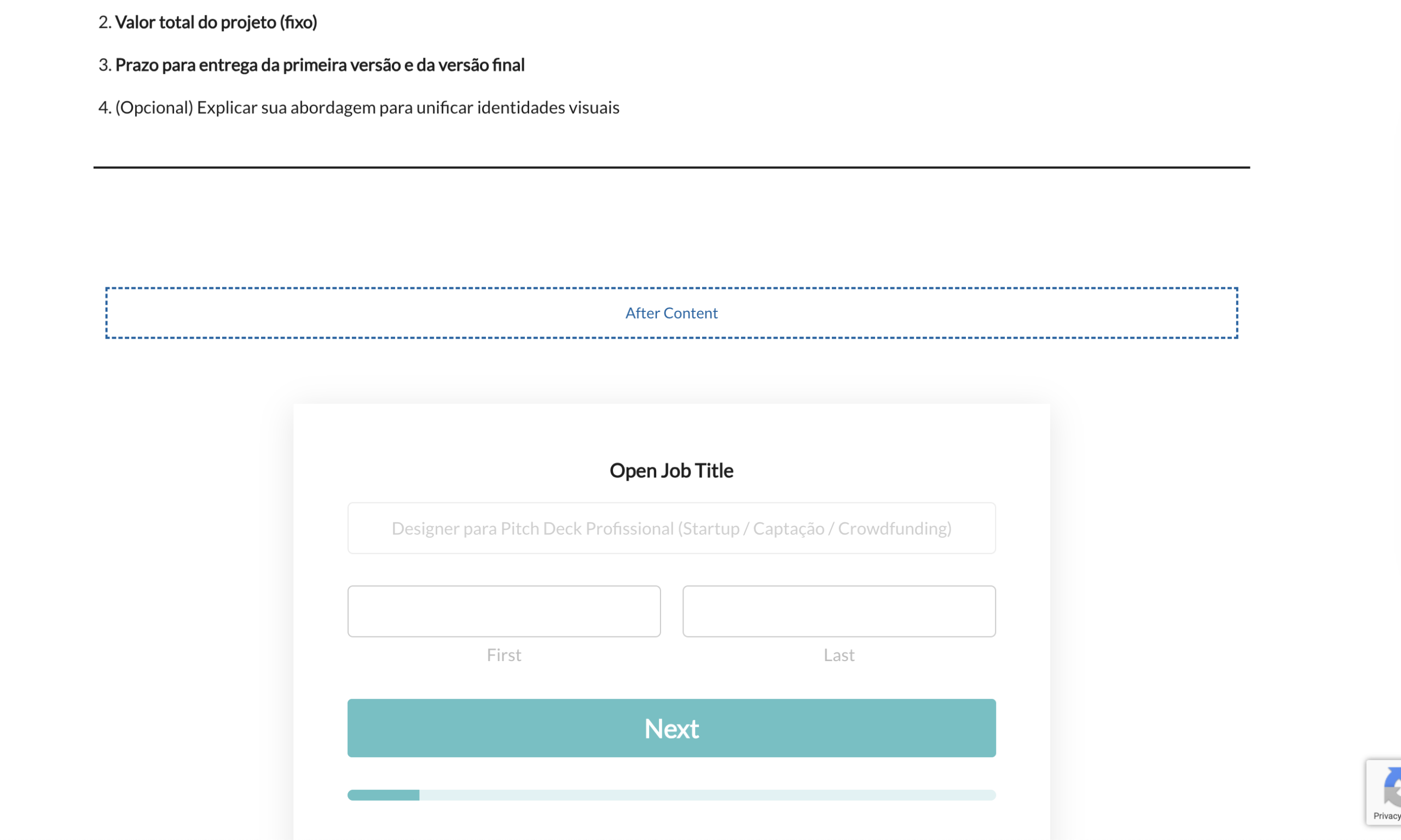
    A custom layout—also named BidFormV2—was created using Neve’s Custom Layouts feature. This layout contains the entire form logic and is configured to display only on specific Studio.haus post types. The visibility is controlled by matching the form’s internal field “Open Job Title” with the title of the job post, ensuring the correct form appears for each position.

    Inside this layout, the new multi-step submission form was embedded. The form captures name, email, phone, project bid details, pricing, delivery timelines, and required portfolio uploads. All fields are mapped to a connected Google Sheet, allowing every submission to be automatically recorded and organized. The mapping includes a custom hyperlink to each entry’s details page inside WordPress for internal tracking.

    The system now supports per-job application tracking, since each open job post uses the same form template but passes its unique job title into the hidden field. This allows the Google Sheet to catalog submissions by project without needing separate forms.

    Screenshots and PDFs documenting the layout, the hook placements, and the Google Sheet mapping were also generated for reference.

    Additionally, the job pages now have room for a visual call-out section to be added directly above the social share icons. This will allow Catalyst Win to display a remark such as:

    “Conhece alguém ideal para esta vaga? Clique abaixo para compartilhar.”
    and use the existing WhatsApp / Messenger / Email / Facebook / LinkedIn sharing buttons already rendered by the theme.

    All components are currently active and functioning as expected, and the BidFormV2 layout is published and tied to the correct post type templates.
  • ✅ WEB DEVELOPMENT MILESTONE — Google Sign-In Integration Completed for StayWithJay.com

    ✅ WEB DEVELOPMENT MILESTONE — Google Sign-In Integration Completed for StayWithJay.com


    ✅ WEB DEVELOPMENT MILESTONE — Google Sign-In Integration Completed for StayWithJay.com

    Milestone Date: November 21, 2025

    Platform: StayWithJay.com

    Owner: Jay Silva

    Status: ✔ Completed

    Purpose: Enable Google OAuth login for guests, partners, support team, and operational staff.


    1. Objective

    Implement Sign in with Google on StayWithJay.com using the official Google Site Kit plugin, ensuring:

    • Fast authentication
    • Secure OAuth 2.0 integration
    • Future use for guest dashboards, staff portals, investor pages, and review systems
    • Alignment with Catalyst Win’s unified login ecosystem

    2. Google Cloud Identity Configuration

    Inside Google Cloud → Google Identity → Site Kit integration, the following values were used:

    • Project Name: StayWithJay
    • Application Name: StayWithJay
    • Support Email: jayaugustosilva@gmail.com
    • Authorized JavaScript Origin:
      https://clevelandbyjay.com
      
    • Authorized Redirect URI:
      https://clevelandbyjay.com/wp-admin/index.php?oauth2callback=1
      

    After submitting the credentials, Google generated the OAuth client.


    3. OAuth Credentials Generated

    StayWithJay now has its OWN dedicated OAuth client:

    Client ID:

    1065105042404-6ik138fv8pdbdph2540mli23ni79n75i.apps.googleusercontent.com
    

    (Stored in Google Cloud + WP Site Kit)

    This ID is specific to StayWithJay.com and completely separate from the CatalystWin.com login system.


    4. WordPress Site Kit Setup

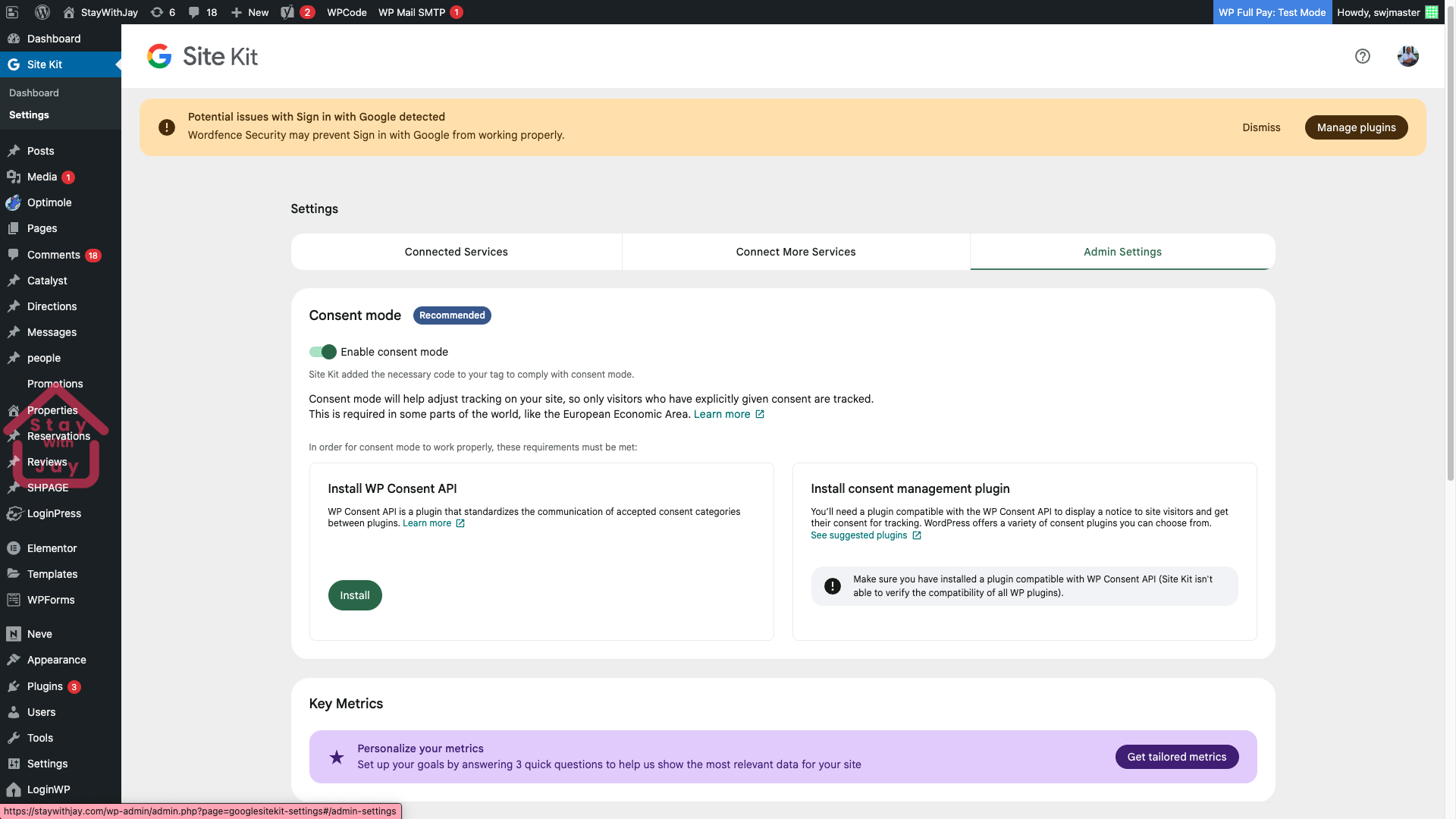
    Inside WordPress Admin → Site Kit → Settings, Google Sign-In was configured using the newly created Client ID.

    Site Kit confirmed successful integration and displayed the Connected state.

    System notices reviewed:

    • WordFence warning (does not block functionality)
    • Consent mode optional

    5. Screenshots Included in This Milestone

    (All screenshots from the user’s environment stored for documentation)

    Screenshot A — Google CloudOAuth Setup

    /mnt/data/Screenshot 2025-11-28 at 15.34.30.png
    /mnt/data/Screenshot 2025-11-28 at 15.34.30 (2).png
    /mnt/data/Screenshot 2025-11-28 at 15.34.42.png
    /mnt/data/Screenshot 2025-11-28 at 15.34.42 (2).png

    Screenshot B — WordPress Site Kit Admin

    /mnt/data/Screenshot 2025-11-28 at 15.38.37.png
    /mnt/data/Screenshot 2025-11-28 at 15.38.37 (2).png

    Screenshot C — Browser Views / Environment

    /mnt/data/Screenshot 2025-11-28 at 15.34.42.png (Map view / environment context)


    6. Result

    StayWithJay.com now has a fully active Google Sign-In integration, enabling:

    • One-click login for staff, partners, and guests
    • Future integration with StayWithJay dashboards
    • Consistent auth system across Catalyst Win & StayWithJay platforms

    7. Next Scheduled WebDev Actions

    (These will be built as separate posts, as previously planned.)

    Post A — Customize the Google Login Button

    Colors, size, shape, text, branding alignment.

    Post B — Add Google Login to Any Page

    Shortcodes, custom blocks, Elementor, PHP template injection.

    Post C — Enable Google-Based Registration

    Allow visitors to create accounts through the StayWithJay site using Google.


    Milestone Completed

    StayWithJay now supports Google OAuth authentication using a dedicated, properly configured client.


  • Building the New Lead Form

    Building the New Lead Form

    Codigo de Qualificacao


    🕒 11/10/2025 – 11:03 PM EST

    Here’s your full WPForms AI prompt — you can copy and paste this directly into WPForms’ AI form builder.
    It’s written so that WPForms automatically builds the full Investor Registration + NDA Form, with all logic, pages, and conditions set up in Portuguese (Brazil) and ready for CatalystWin’s portal.


    ✅ WPForms AI Prompt

    Build a multi-page form in Brazilian Portuguese called “Acesso a Oportunidades (Registro + NDA)” for CatalystWin.
    The form will combine investor registration and digital NDA signature in one workflow.
    Include validation, conditional logic, e-signature, and confirmation email setup.

    Page 1 – Dados do Investidor

    • Nome completo* (campo de texto, obrigatório)
    • E-mail* (campo de e-mail, obrigatório)
    • Telefone / WhatsApp* (campo de telefone internacional, obrigatório)
    • País* (menu suspenso com Brasil, EUA, outros)
    • Estado/Província (mostrar apenas conforme país selecionado)
    • Cidade (texto)
    • Organização (opcional) (texto)
    • Perfil do investidor* (botões de rádio):
      • Sou investidor individual
      • Family office / Holding patrimonial
      • Fundo / Gestora
      • Operador/Empresário do setor
      • Outro

    Page 2 – Código de Convite e Qualificação

    • Código de Convite (Invitation Code) (texto curto, opcional, regex ^(CW-)?[A-Z0-9]{6}$)
    • Se o código estiver vazio, exibir perguntas de qualificação:
      • Você possui o valor mínimo para investir nesta oportunidade?* (Sim / Não)
      • Faixa de comprometimento de capital imediato* (menu suspenso):
        • Até R$ 250 mil
        • R$ 250 mil – R$ 1 mi
        • R$ 1 mi – R$ 5 mi
        • Acima de R$ 5 mi
      • Por que você deseja investir neste deal?* (parágrafo)
      • Prazo de prontidão* (botões de rádio):
        • Pronto para avançar agora (até 7 dias)
        • 2–4 semanas
        • Preciso de mais informações antes de decidir
    • Se o código de convite estiver preenchido, ocultar perguntas de qualificação e exibir:
      • Observações (opcional) (parágrafo)

    Page 3 – Acordo de Confidencialidade (NDA)

    Adicione uma caixa de texto grande (HTML description) com este resumo:

    Resumo do NDA:

    • Parte Reveladora: CatalystWin Consulting e empresas/ativos apresentados.
    • Parte Receptora: o usuário que se registra neste formulário.
    • Objeto: acesso a materiais de oportunidades (teasers, dados financeiros, contratos).
    • Uso Permitido: somente para avaliação de investimento, vedada divulgação.
    • Prazo: 3 anos (5 anos para dados técnicos).
    • Jurisdição: São Paulo, Brasil.
    • Assinatura eletrônica válida e vinculante.

    Campos abaixo do texto:

    • Aceite do NDA* (checkbox obrigatório): “Li e concordo com os termos do Acordo de Confidencialidade (NDA).”
    • Nome para assinatura* (texto curto, obrigatório)
    • Assinatura Eletrônica* (campo de assinatura digital WPForms Signature Addon)
    • Data/Hora de Assinatura (campo oculto com data/hora atual)

    Page 4 – Preferências e Confirmação

    • Oportunidade de interesse* (checkbox múltipla):
      • Operação de Segurança Regulada (Confidencial)
      • Vinícola Boutique / Enoturismo (Confidencial)
      • Outras oportunidades compatíveis com meu perfil
    • Nível de interesse* (botões de rádio):
      • Quero avançar imediatamente
      • Quero conversar primeiro
      • Quero apenas acessar materiais sob NDA
    • Consentimento LGPD* (checkbox obrigatório):
      “Autorizo o tratamento dos meus dados para análise de elegibilidade e contato.”
    • Canal de contato preferido (botões de rádio): E-mail / WhatsApp / Telefone
    • Upload (opcional) — comprovante de investidor qualificado ou carta-banco (pdf, docx, jpg, máx. 10 MB)
    • Botão Enviar: texto “Solicitar Acesso Sob NDA”

    Conditional Logic

    • Se o campo Código de Convite estiver vazio → mostrar campos de qualificação (mínimo, faixa, motivo, prontidão).
    • Se o campo Código de Convite estiver preenchido → ocultar esses campos e mostrar Observações.
    • Estado/Província aparece apenas quando o país for Brasil ou EUA.

    Confirmation Message

    Título: Pedido recebido com sucesso ✅
    Texto:
    “Obrigado! Seu NDA foi assinado e seu pedido de acesso foi registrado.
    Em breve nossa equipe enviará as credenciais do data room ou entrará em contato com você.”

    Email Notifications

    • Admin email: opportunities@catalystwin.com
      • Subject: Novo Registro + NDA — {nome completo}
      • Include all fields and attachments.
    • User confirmation email:
      • From: opportunities@catalystwin.com
      • Subject: Confirmação de NDA e Solicitação de Acesso
      • Message: resumo do NDA, número do registro e próximos passos.

    Security

    • Enable reCAPTCHA + honeypot.
    • Add hidden fields for {user_ip}, {page_url}, {page_title}.

    Style Instructions

    • Use CatalystWin colors: navy (#0A1833), gold (#C6A664), and white background.
    • Make the form 3-step progress visible with page titles on top.
    • Include a short hero text above:

    “Os melhores deals andam rápido. Complete seu registro, assine o NDA e tenha acesso imediato às oportunidades CatalystWin.”


    Paste this entire block into WPForms AI → click Generate Form → it will automatically build all pages, logic, and NDA workflow in seconds.

  • New

    New

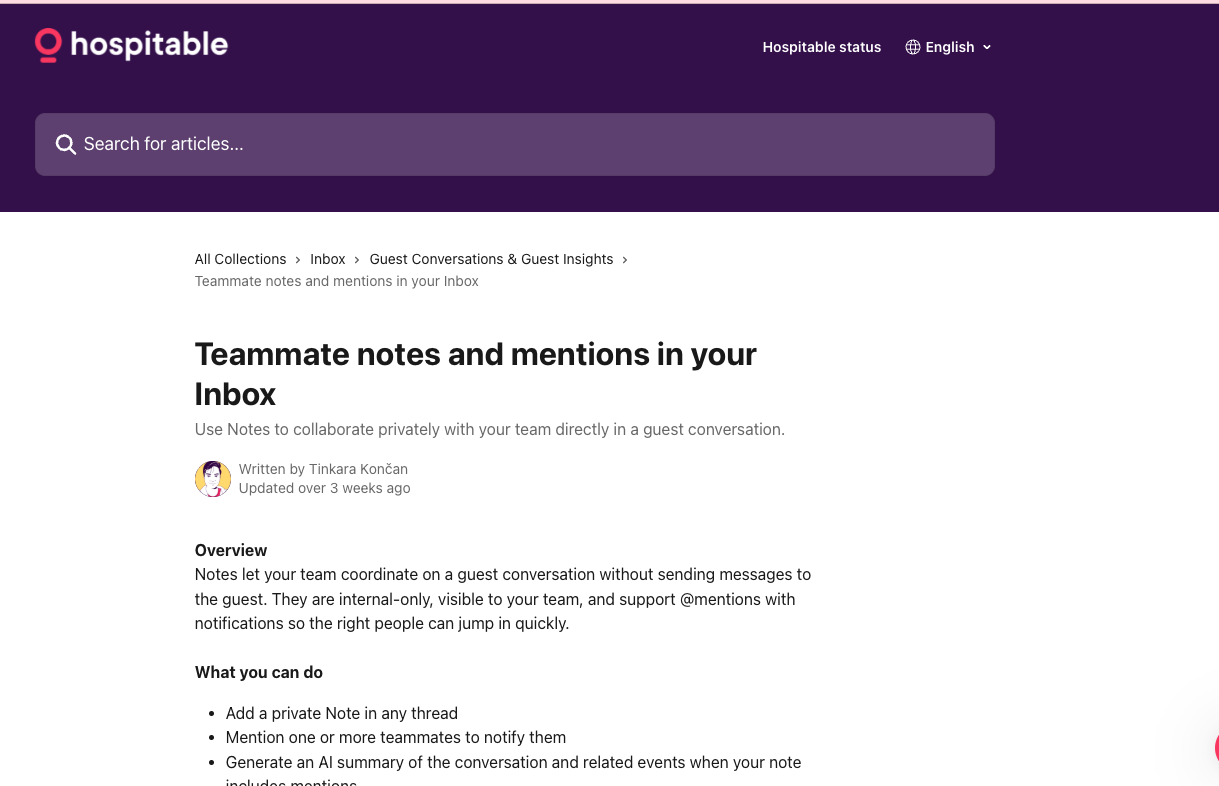
    Content: I think this feature might be interesting to try. Not sure if the language barrier can be crossed, but interesting. At a minimum, testing the feature will at least serve as a benchmark for a similar internal solution. This internal solution, in fact, it is already under development. See guestmessagebox pattern within our wordpress Neve environment.

    This layout is super, super clean for blog pages, and if ours can follow this in any way, our communications and messages should come across just fine.

    Here is the link for the hospitable page.

    https://help.hospitable.com/en/articles/12311688-teammate-notes-and-mentions-in-your-inbox