Author: Jay

  • House Update: Power Outage

    House Update: Power Outage

    July 4, 2026, 12:06 PM EST

    House Update

    System: Power (Electricity)
    Property: P-2007
    Status: 🔴 Outage

    Power service to Property P-2007 has been unavailable since approximately 10:30 AM EDT on July 3, 2026 due to a widespread utility outage affecting portions of the Cleveland area.

    This outage is not isolated to the property and is part of a larger regional utility event. Utility crews continue restoration efforts.

    Current estimated restoration: 6:00 PM EDT — July 4, 2026 (utility estimate; subject to change).

    We appreciate your patience while utility providers complete repairs.

    Sources

    • FirstEnergy Storm Center (official outage map):  
    • Cleveland Public Power Outage Map:  

    House Update

    System: Internet Connectivity (Spectrum)
    Properties: P-2007 & P-2014
    Status: 🔴 Service Interruption

    Internet service is currently unavailable at Properties P-2007 and P-2014 due to a Spectrum service interruption associated with the ongoing regional power outage.

    Current estimated restoration: 6:00 PM EDT — July 4, 2026 (estimated and subject to change as utility service is restored).

    Once commercial power is restored and network equipment fully reconnects, internet service should return automatically without any action required by guests.

    Sources

    • FirstEnergy Storm Center (official outage information):  
    • Cleveland Public Power Outage Map:  
  • Development Update – Reservation Archive & PMS Integration

    Development Update – Reservation Archive & PMS Integration


    Development Update – Reservation Archive & PMS Integration

    Date: July 2, 2026

    Team,

    Today’s work produced several important improvements to the Reservation integration between Hostipable, Zapier, and WordPress.

    Completed

    1. Reservation Archive Redesign

    The Reservation Archive page has been significantly improved.

    Instead of showing minimal information, each reservation card now displays:

    • Reservation Code
    • Reservation Status
    • Guest Name
    • Number of Paid Guests
    • Booking Platform
    • Check-in Date
    • Room Category
    • Room Name
    • Property Address
    • Total Paid

    This makes the reservation archive much more useful as an operational dashboard.


    2. Property Category Mapping

    Hostipable now sends the room category (examples: P2007S4, P2014R1, etc.).

    Using this information we can determine:

    • Property
    • Address
    • Building
    • Other metadata

    This is a major improvement because the UI can now identify the property regardless of which room was booked.

    Example:

    Room Category
    P2007S4
    
    ↓
    
    Property
    2007 West 100th Street
    
    ↓
    
    Display correct address automatically
    

    This opens the door to much richer reservation displays.


    3. Reservation Information Display

    Reservation cards now contain enough information for staff to quickly identify:

    • where the guest is staying
    • what platform booked it
    • guest count
    • payment amount
    • exact room
    • exact property

    without opening the reservation.


    Important Next Feature

    Guest Reservation Claim

    One major missing feature became obvious.

    Currently reservations exist independently of users.

    Instead, reservations should eventually become attached to the guest’s account.

    Desired workflow:

    Reservation Created
    ↓
    
    Guest receives invitation
    
    ↓
    
    Guest creates/logs into account
    
    ↓
    
    Guest claims reservation
    
    ↓
    
    Reservation permanently linked to user account
    

    Benefits:

    • Guest Dashboard
    • Messaging
    • Digital Guidebooks
    • Checklists
    • Future Reservations
    • Loyalty tracking
    • Better CRM
    • Personalized experience

    This is probably one of the highest-value improvements for the platform.


    Issue Discovered

    The Reservation Archive currently shows duplicate reservation cards after updates.

    Example:

    Reservation HMP9NNQPXE
    
    Changed
    
    Reservation HMP9NNQPXE
    
    Changed, Edgewater Residence VII
    

    and

    Changed
    
    Changed, P2014 Edgewater Residence XIV
    

    This indicates that updates are being inserted as new records rather than updating the existing reservation.

    The synchronization process should instead:

    Find reservation by Reservation ID
    
    ↓
    
    Update existing reservation
    
    ↓
    
    Do NOT create a duplicate post
    

    Possible Enhancement

    Once the property mapping is stable, we can expose additional information automatically:

    • Property photos
    • House Manual
    • Parking Instructions
    • Wi-Fi
    • Smart Lock Instructions
    • Emergency Contacts
    • Maintenance Contacts
    • Local recommendations

    without requiring additional reservation-specific data.


    Overall Progress

    Today’s work substantially advances the architecture toward a true PMS-backed reservation system in WordPress.

    The reservation archive is now evolving from a simple list into an operational dashboard, while the new property mapping creates the foundation for guest portals, property intelligence, and future automation.

    The next major milestone should be implementing Reservation Claiming, which will connect reservations to registered users and unlock personalized guest experiences.

  • July 1st

    July 1st

    New Master Report/Dashboard transferred from Excel to Gsheets…

    This is already helping for example:

    • 1.04 dias de lead time para Miercoles con promedio de 806 for Wednesdays. So the price for tomorrow is the price by which we need to be competitive
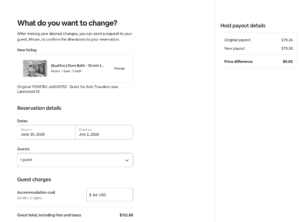
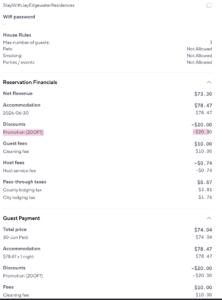
      The image arriba es de la reserva de Tiana, que reservo directo, y utilizo un codigo de descuento.. 20OFF.. y nosotros todavia logramos mas de 50 dolares por la noche que significa



    • Can we give people time off on  4th of July
  • WordPress Taxonomies Explained: Understanding Permalinks, Qu

    WordPress Taxonomies Explained: Understanding Permalinks, Qu


    WordPress Taxonomies Explained: Understanding Permalinks, Query Variables, and Public Access

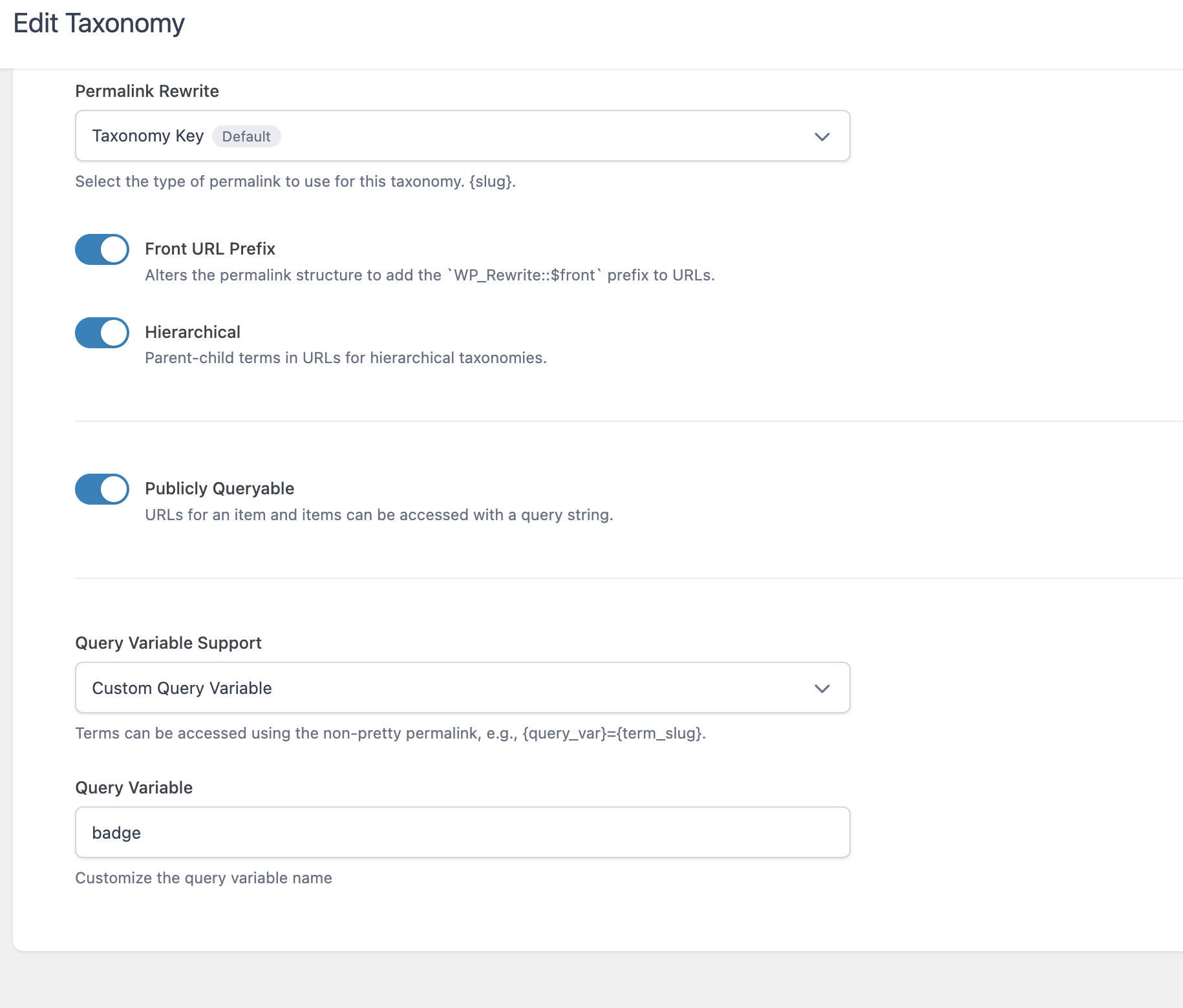
    When I first looked at the Taxonomy settings screen in WordPress, I saw terms like Permalink Rewrite, Hierarchical, and Query Variable. If you’re new to WordPress development, those settings can feel intimidating.

    The good news is that they’re actually much simpler than they appear.

    Let’s use a real example.


    My Example

    I’m creating a taxonomy that uses the query variable:

    badge
    

    That means I’m organizing content by badges.

    Imagine I have badges like:

    • Gold
    • Silver
    • Verified
    • Featured

    Each badge becomes a taxonomy term.

    Think of a taxonomy as simply another way to organize content.

    Posts have Categories.

    Posts have Tags.

    You can create your own grouping called Badges.


    What is a Taxonomy?

    A taxonomy is nothing more than a way to organize things.

    Think about your computer.

    You might have folders like

    Documents
    Pictures
    Taxes
    Invoices
    

    Those folders help organize files.

    A taxonomy does the same thing inside WordPress.

    Instead of organizing files…

    …it organizes Posts, Products, Listings, or any Custom Post Type.


    What is a Term?

    Inside every taxonomy are terms.

    For example

    Taxonomy

    Badges
    

    Terms

    Gold
    Silver
    Verified
    Premium
    

    The taxonomy is the container.

    The terms are the individual labels.


    Permalink Rewrite

    This setting determines what the URL looks like.

    Suppose my taxonomy is called

    badge
    

    and I have a term named

    gold
    

    The URL might become

    https://example.com/badge/gold/
    

    Notice how badge appears in the URL.

    That’s the taxonomy key.

    If I changed the taxonomy key to

    achievement
    

    the URL would become

    https://example.com/achievement/gold/
    

    Nothing about the content changed.

    Only the URL structure changed.


    Front URL Prefix

    This setting depends on your site’s permalink structure.

    Most websites never need to worry about it.

    Suppose all of your posts already live under

    https://example.com/blog/
    

    If Front URL Prefix is enabled, your taxonomy URLs might become

    https://example.com/blog/badge/gold/
    

    instead of

    https://example.com/badge/gold/
    

    If your site doesn’t use a front prefix, turning this on or off often makes no visible difference.


    Hierarchical

    This allows parent and child terms.

    Imagine this structure.

    Awards
        Gold
        Silver
    

    Instead of

    badge/gold
    

    the URL could become

    badge/awards/gold
    

    This is very similar to folders on your computer.

    Photos
        Vacation
            Florida
    

    The hierarchy simply preserves the path.


    Publicly Queryable

    This determines whether people can actually visit the taxonomy.

    If this is enabled…

    Someone can visit

    example.com/badge/gold
    

    and WordPress will display all content tagged with the Gold badge.

    If disabled…

    The taxonomy still exists internally, but visitors cannot browse it directly.

    This is useful when a taxonomy is only meant for administrative purposes.


    Query Variable

    This is one of the easiest settings to understand once you see an example.

    Mine is set to

    badge
    

    That means WordPress also understands URLs like

    example.com/?badge=gold
    

    This is called a query string.

    Instead of using the pretty URL

    example.com/badge/gold
    

    WordPress reads

    ?badge=gold
    

    Both are simply two different ways of asking WordPress for the same information.


    Pretty URL vs Query String

    Pretty URL

    example.com/badge/gold
    

    Query String

    example.com/?badge=gold
    

    They both tell WordPress exactly the same thing.

    “Show me everything with the Gold badge.”

    One looks cleaner.

    The other is easier for computers and developers to generate.


    Bringing It All Together

    Using my settings, WordPress understands requests like these.

    Pretty permalink

    /badge/gold/
    

    Query variable

    ?badge=gold
    

    Because Hierarchical is enabled, it can also understand URLs like

    /badge/awards/gold/
    

    And because Publicly Queryable is turned on, visitors can actually browse those pages.


    Final Thoughts

    Many WordPress settings look technical simply because of the terminology. In reality, these options answer a few straightforward questions:

    • What should the URL look like? (Permalink Rewrite)
    • Should parent and child terms appear in the URL? (Hierarchical)
    • Can visitors browse this taxonomy? (Publicly Queryable)
    • Can WordPress also find it using a URL parameter? (Query Variable)

    Once you understand those four ideas, you’ve grasped most of what this settings page is doing. The rest is simply WordPress giving you flexibility in how your content is organized and how users—and WordPress itself—can access it.